

Discover how a food scanner app can simplify healthy eating while preventing mistakes. Learn how My Food Checker’s allergy alerts, ingredient insights, and scanner help you shop confidently, avoid allergens, and stick to your diet without missing critical details.
In this blog, we explore the benefits and limitations of this technology, focusing on My Food Checker and its intelligent food preferences scanner feature.
Table of Contents
Why is a Food Scanner App a Game Changer?
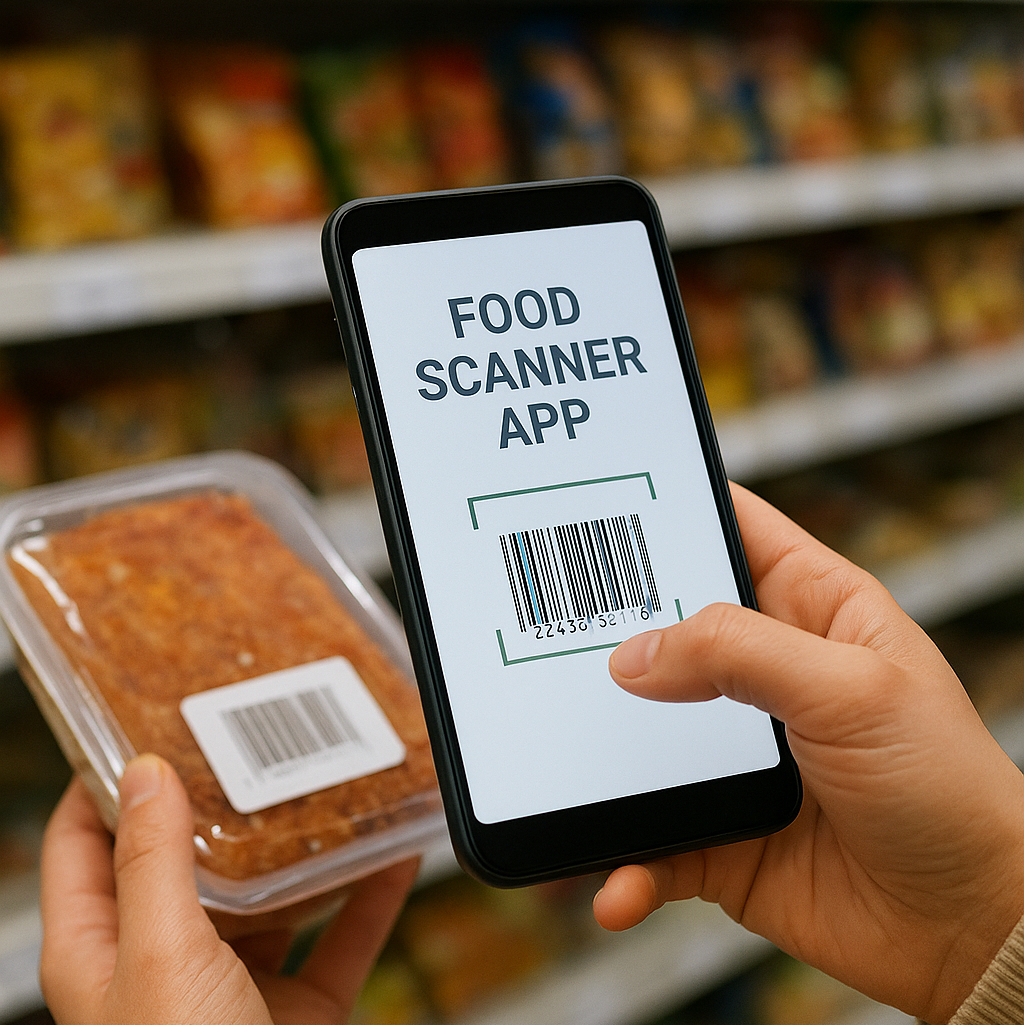
Instant Ingredient Transparency:- You can scan any product barcode and instantly access detailed ingredient lists, allergen warnings, and information about hidden additives. This feature is especially valuable for anyone with allergies, dietary restrictions, or ethical food considerations. Explore it here: My Food Checker
Personalized Diet Management:- The app includes powerful food preferences that allows you to set your personal dietary rules. Whether you follow a vegan lifestyle, a low-sugar diet, nut-free regimen, or specific cultural diets like Jain, the app automatically highlights products that match your preferences and filters out those that don’t.
Allergy and Safety Alerts:- This feature is particularly useful for parents monitoring their children’s diets, individuals with severe allergies, or anyone who wants to ensure the food they consume is safe. With timely alerts and clear warnings, you can make informed choices every time you shop.
Track and Remember Past Scans:- Another convenient feature is the ability to store and revisit past scans. Over time, the app creates a personalized database of foods you know are safe and align with your dietary preferences.
The Advantages of a Food Preferences Scanner
This makes shopping and meal planning much easier by tailoring the experience to your individual needs. Instead of just showing ingredients, it acts as a personal guide, helping you make safer and more informed choices. The scanner automatically filters out foods that may not be suitable for you, whether due to allergies, lifestyle choices, or dietary restrictions, so you can quickly see which items are safe and which to avoid.
It also identifies hidden ingredients, such as additives or preservatives, that might conflict with your needs, giving you full transparency before you make a decision. As you scan more products, the app organizes them into lists of foods that are safe and those that may be risky, creating a personal library of trusted items. Over time, this saves you from having to double-check products and makes shopping quicker and more confident.
The scanner also adapts to changes in your dietary preferences. Whether you develop new allergies, start a new lifestyle plan, or adjust your health goals, you can update your preferences, and the app will instantly show which products now fit your needs.
Learn more and start using it here: My Food Checker
Pro Tips:
- Set up complete preferences first
Before you start scanning, make sure to enter all relevant allergens, religious restrictions, or dietary rules into the food preferences scanner. This ensures the app can give the most accurate guidance and reduces the chance of unsafe food slipping through. - Scan products before buying
Always check items in-store before making a purchase. Even if a product looks familiar, using a food scanner app to scan it first allows you to catch hidden ingredients or unexpected additives. This proactive approach minimizes surprises at home and ensures that the foods you bring into your kitchen match your dietary or ethical goals. - Read flagged ingredient lists carefully
When a product is flagged, whether safe or risky, take a moment to review the ingredients in detail. Additives or new components might not be fully captured by the app’s initial scan, so a quick check ensures you make fully informed choices. For any uncertainties, you can explore more details on My Food Checker. - Report missing items or errors
If a product isn’t in the database or you notice inaccurate information, use the “report issue” feature. This helps improve the app’s accuracy over time and contributes to a reliable resource for everyone. Your feedback makes the scanning experience better for the whole community. - Review your scan history regularly
Going back through your previous scans allows you to track which foods are consistently safe and which brands you trust. Over time, this builds a personal library of reliable products and helps speed up future shopping trips. - Update preferences with dietary changes
If you start a new diet, discover new allergies, or modify your health goals, make sure to update your preferences. The scanner adapts to these changes, ensuring that your results always reflect your current needs. - Don’t rely entirely on nutrition estimates
Use nutritional values as guidance rather than exact measurements. While the app provides helpful approximations, labels or independent sources may have slight variations, so it’s best to treat the numbers as reference points. - Use the app when traveling
When exploring new cities or countries, unfamiliar products can pose a risk. Scanning items on the go helps you navigate grocery stores or restaurants safely and allows you to maintain your dietary habits no matter where you are. - Cross-check for confidence
For critical allergens or specific dietary requirements, double-check the product on the manufacturer’s website or other trusted sources. This extra step ensures you’re fully confident in your choices, especially for foods you consume regularly. - Encourage family participation
Share scanning habits with family members, roommates, or caregivers. Making it a group routine promotes safer eating practices and helps everyone in the household stay aligned with dietary or allergy requirements.
FAQs
How does a food scanner app make grocery shopping safer?
The app lets you scan barcodes and instantly see ingredients, allergens, and nutritional information. Some apps also include a personal preferences feature that filters products based on your dietary needs, helping prevent mistakes. Learn more at My Food Checker.
Can I trust the ingredient information entirely?
The app’s data is updated regularly, but some products may change their ingredients over time. Using the food preferences scanner can help filter items according to your dietary needs, but if you have severe allergies or sensitivities, it’s always best to verify allergens manually before consumption.
Is offline scanning possible?
While you cannot scan new items without an internet connection, past scans remain accessible offline, allowing you to refer to your safe foods anytime.
How customizable are dietary preferences?
The app allows detailed customization through its preferences feature. You can set rules for allergies, vegan or low-sugar diets, and religious dietary requirements, ensuring the results match your individual needs.
What if a product is not in the app?
If a product isn’t available in the database, you can manually add it or report it to the support team. The submissions are reviewed and added over time, helping improve the app for all users.
Conclusion
A food scanner app like My Food Checker simplifies grocery shopping, improves safety, and supports mindful eating. Coupled with a food preferences scanner, it ensures that your dietary choices are respected and that you avoid allergens or unwanted ingredients. While it is not a replacement for personal judgment, using it thoughtfully makes healthy eating more manageable, precise, and stress-free.
